
The question
Which transactions should an analyst review first, and can each flag be traced to an explicit rule?
Work through the analysis
Define the review rules
Flag an amount of at least €1,000 on a new device, or the third or later payment from one account within ten minutes. These thresholds are teaching choices, not calibrated production controls.
Sort before using a time window
Parse timestamps and sort the records. For each account, retain payments within the preceding ten minutes. Add a record to the review queue when either rule fires, retaining the transaction ID and reasons.
Inspect the calculated queue
The supplied 24 transactions produce four review records. Three match the large-amount/new-device rule; one matches the repeated-payment rule. Open review-queue.csv to inspect each transaction and reason.
Calculated results
- transactions
- 24
- review records
- 4
- explicit rules
- 2
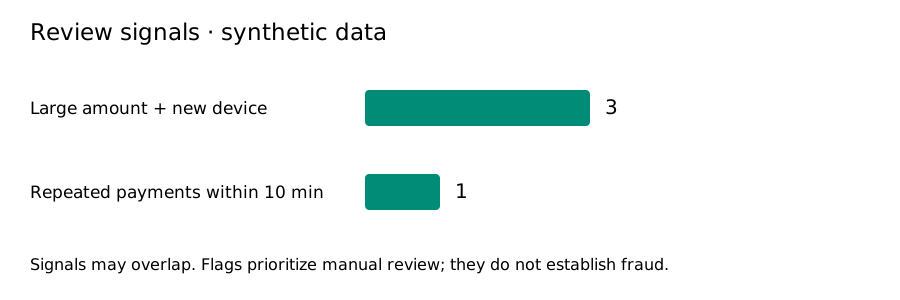
| Transaction | Synthetic account | Revenue (EUR) | Review signals |
|---|---|---|---|
| TXN-005 | ACCT-05 | 1500.00 | Large amount and new device |
| TXN-010 | ACCT-DEMO | 120.00 | Repeated payments within ten minutes |
| TXN-012 | ACCT-04 | 1500.00 | Large amount and new device |
| TXN-019 | ACCT-03 | 1500.00 | Large amount and new device |
What the result can and cannot tell you
A flag requests review. It does not establish fraud. There are no verified fraud labels, so precision, recall, and detection accuracy cannot be calculated. An unflagged transaction is not proven safe. A production system would need independently labeled cases, validated thresholds, and review of missed cases.
Move TXN-010 outside the ten-minute window and rerun the code. Explain why the queue changes. Then change the amount threshold and document which records move in or out.
Download and reproduce
Run locally with Python 3
python3 analyze.py --input input.csv --output resultsUses Python 3 and its standard library. No API keys or additional packages are required.
Build work you can explain
Create a learner account to request access to guided projects. Review prerequisites and access conditions before choosing a course.